SolarEdge API v2
Connecting directly to the SolarEdge Portal via API v2 has the following limitations:
- No anomaly detection: Inverter DC input values are not available, which prevents anomaly detection.
- No live values: Due to the very high cost of API calls, Novasense retrieves data only once a day.
- Additional costs: This connection generates additional costs. Clarify the costs and restrictions with your sales organization before proceeding.
Due to these limitations, Novasense recommends using a datalogger instead of a direct connection to the SolarEdge Portal.
Before Linking Your Plants
Only users with the SolarEdge "plant owner" role can connect an installation. Before opening a connection link, make sure the SolarEdge account you use has this role for each plant you want to connect.
You must be logged in to the Novasense Portal before linking your plants. If you do not have login credentials, contact first-level support.
Connection Process
-
Contact first-level support and provide the list of power plants you want to connect. For each plant, include:
- The name of the plant.
- Your internal unique identifier, if one is defined.
-
Support will send you one connection link per plant.
-
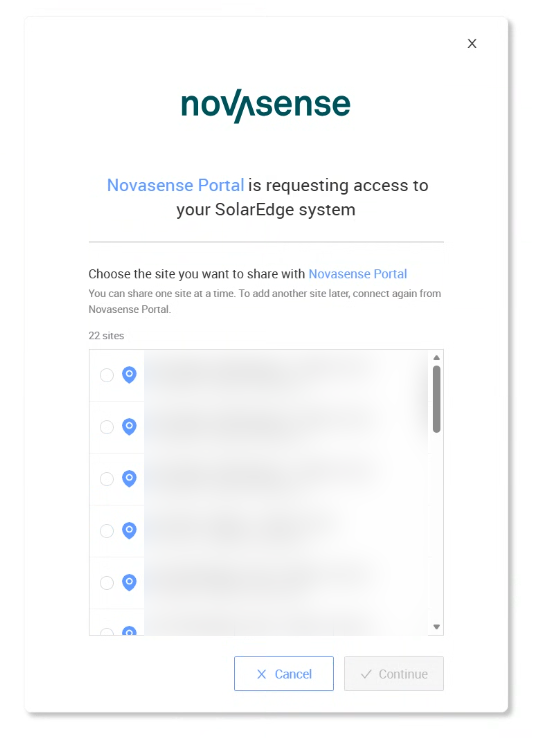
While logged in to the Novasense Portal, open each connection link and select the corresponding plant to connect. Repeat this for every plant in your list.
-
Inform first-level support once you have completed the connections.
-
Continue with the normal Plant Onboarding Process. The API v2 limitations described above still apply.